DBI WatchGuard
Your shop's night guard, powered by the CCTV you already own.
Know the moment someone is at your shutter. WatchGuard watches your shutter or gate while the shop is closed and sends an instant photo alert, using your existing cameras and the DBI hardware device.
See it in action
DBI WatchGuard in action
Watch how it guards your shutter while the shop is closed, using the cameras you already own.
0
New cameras needed
6 steps
From setup to peace of mind
1 click
To mark a false alarm
0 ports
Opened to the internet
Why shop owners need it
Nights leave shops unwatched
Shop owners close up every evening and hope for the best.
Found too late
Break-ins are discovered the next morning.
Nobody is watching
CCTV records everything, but no one watches at 2 AM.
Guards get tired
A night guard also needs rest and takes leave.
Too complicated
Advanced security needs new tools and new hardware, which small shops cannot manage.
Who we build it for
Small shop owners who want to sleep peacefully
Meet Ramesh, who owns a small shop and closes up every evening.
Ramesh
Small shop owner · Kirana · Mobile · Medical · Jewellery
Goal
Sleep peacefully, knowing the shop is watched.
Frustration
Complicated tools, extra equipment and constant false alarms.
What they need
A simple phone alert only when something is really wrong.
Our solution
Turn your existing CCTV into a smart night guard
No new cameras. WatchGuard works with the cameras you already have, through the DBI hardware device (the same device runs DBI CounterGuard too).
Your CCTV cameras
The cameras already at your shutter or gate.
DBI hardware device
Connects your cameras to WatchGuard.
WatchGuard AI
Watches your shutter zone while the shop is closed.
Instant photo alert
A numbered alert with a photo proof arrives instantly.
No new cameras
Works with the cameras you already have.
Instant photo alert
Watches your shutter or gate during closed hours and shows proof.
Learns from you
Every false alarm you mark makes it smarter.
How it works
From setup to peace of mind in six simple steps
- 1
Connect
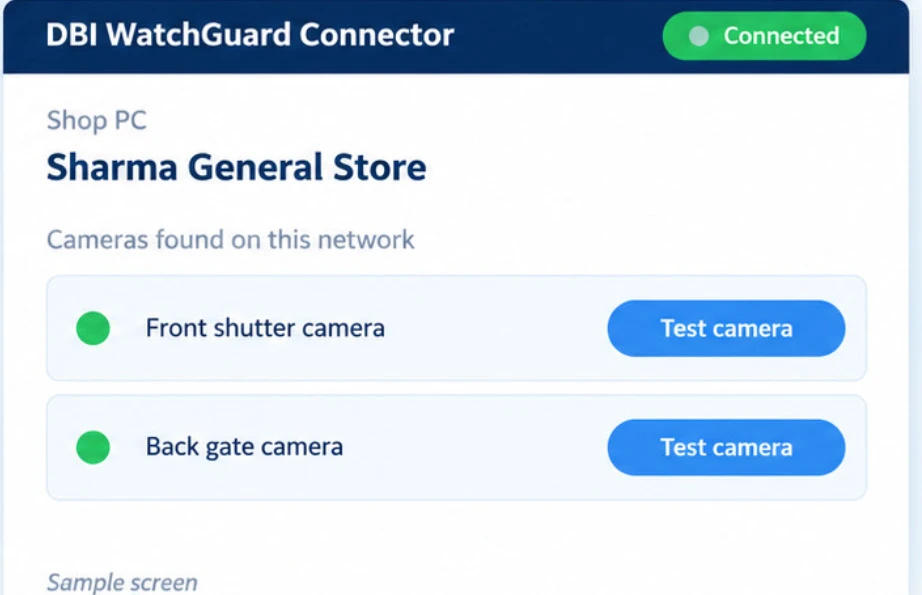
Install the DBI WatchGuard Connector on the shop PC. Your cameras are found automatically.
- 2
Schedule
Set the time your shop is closed.
- 3
Mark the zone
Draw the shutter or gate area on the camera picture.
- 4
Relax
DBI WatchGuard watches quietly all night.
- 5
Get alerted
A numbered alert with a photo arrives instantly.
- 6
Teach it
Mark false alarms in one click. It learns.
Setup made simple
No router changes. The Connector runs on the shop PC alongside the DBI hardware device.
- ✓Pair it with a short code from your panel
- ✓Cameras and channels are found automatically
- ✓Tap “Test camera” to instantly confirm it works
- ✓No ports are opened to the internet
The DBI team confirms the exact installation and camera compatibility for your shop.
Smart alerts
Alerts only when it really matters
You are alerted when
- A person is clearly visible, not wind, animals or shadows
- The person arrived and stopped near the shutter
- The person is not facing the camera
- One alert per event, never repeated spam
An AI that learns your shop
- 1. An alert arrives.
- 2. You tap “False alarm”.
- 3. It remembers that spot and will not bother you for it again.
The more you use it, the more accurate it gets for your shop. You can delete alerts one by one, in bulk or by filter.
An example night
A night with DBI WatchGuard
This is a sample, to show how it feels for a shop owner.
- 1
Evening
You close the shop
Your closing schedule is already set. WatchGuard starts watching the shutter zone you marked.
- 2
All night
A quiet watch
Wind, animals and shadows are ignored, so you are not disturbed for nothing.
- 3
02:14 AM
A person stops at the shutter
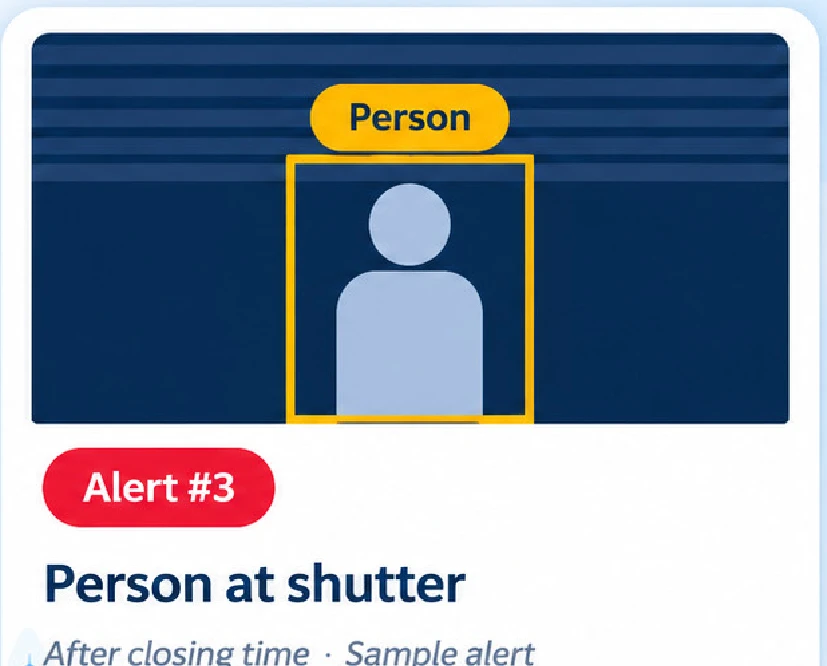
A person arrives, stops near the shutter and is not facing the camera. You get one numbered alert (like Alert #3) with a photo.
- 4
Right away
You see the proof
The photo shows you what is happening, so you can decide what to do. If it was harmless, tap “False alarm” and it remembers that spot.
- 5
Morning
Check your shop at a glance
Open your panel to see the security status, the alerts tonight and the cameras online. You can also watch live video from your phone or browser.
Honest live view
Always know the truth about your cameras
If the camera or AI is offline, DBI WatchGuard says so. It never shows a false “Protected”.
Shown only when a real video frame arrives.
Shown immediately if a camera or the Connector goes down.
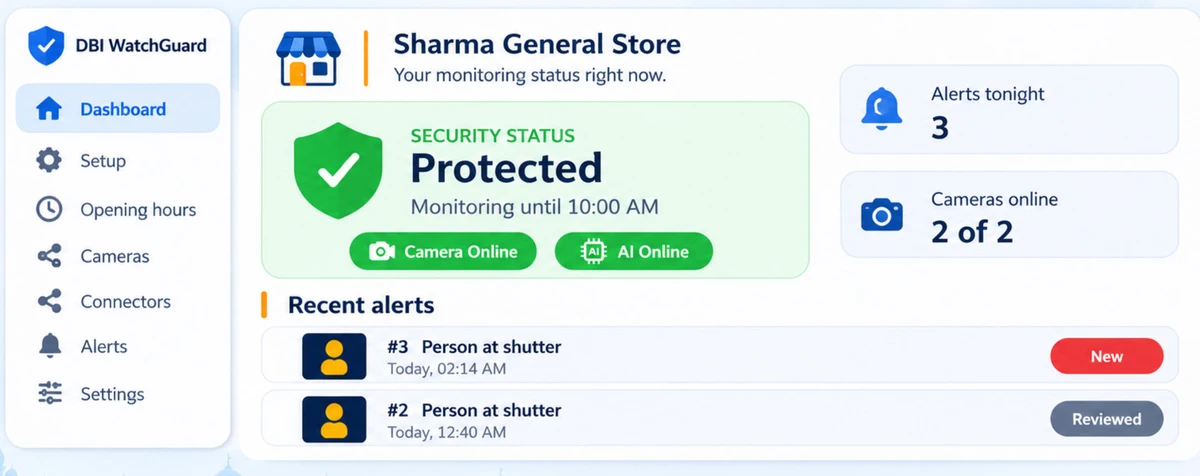
Track your shop's status, alerts and more in one place, and watch live video from your phone or browser.
What you see
Cameras, zones and alerts
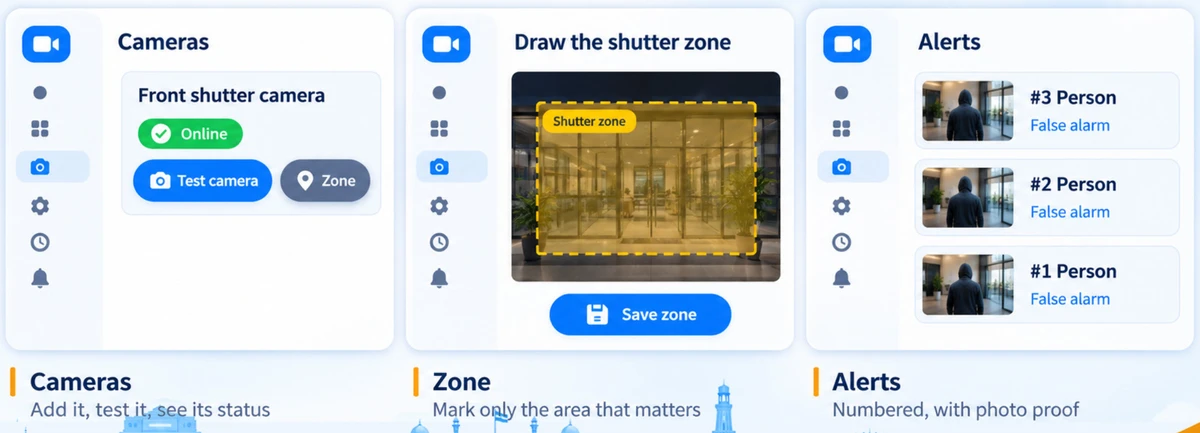
Cameras
Add it, test it, see its status.
Zone
Mark only the area that matters.
Alerts
Numbered, with photo proof.
Privacy and trust
Your cameras. Your data. Your call.
No face recognition
It only detects that a person is there.
Passwords stay safe
Never stored in plain text, sent to the browser or logged.
Private evidence
Photos are access-controlled, with a retention policy.
Authorised cameras only
Only feeds the owner is allowed to use.
Separate data per shop
Every shop's data is kept apart.
Never a false “Protected”
If something is offline, you are told immediately.
Why DBI WatchGuard
Smart surveillance. Smarter choice.
What's next
Ready today, and growing
- Owner panel
- AI person detection
- Live view and numbered alerts
- False-alarm learning
- WhatsApp, SMS and call alerts
- Better low-light detection
- Multiple shops per owner
- Mobile app
- Owner consent and privacy notice
Your shop may sleep. DBI WatchGuard won't.
Questions shop owners ask
Frequently asked questions
No. WatchGuard works with the cameras you already have, connected through the DBI hardware device.
Interested?
Get pricing for your shop
DBI WatchGuard runs on the DBI hardware device and works with the cameras you already have. Pricing is different for each product and shop, so fill the form and your question will reach the DBI team.